Snip it. Mark it.
Prove it.
ConciergeCapture takes a screenshot, marks it up, hides what's private, numbers and watermarks it, and gets it where it needs to go, in seconds. PDFs too.
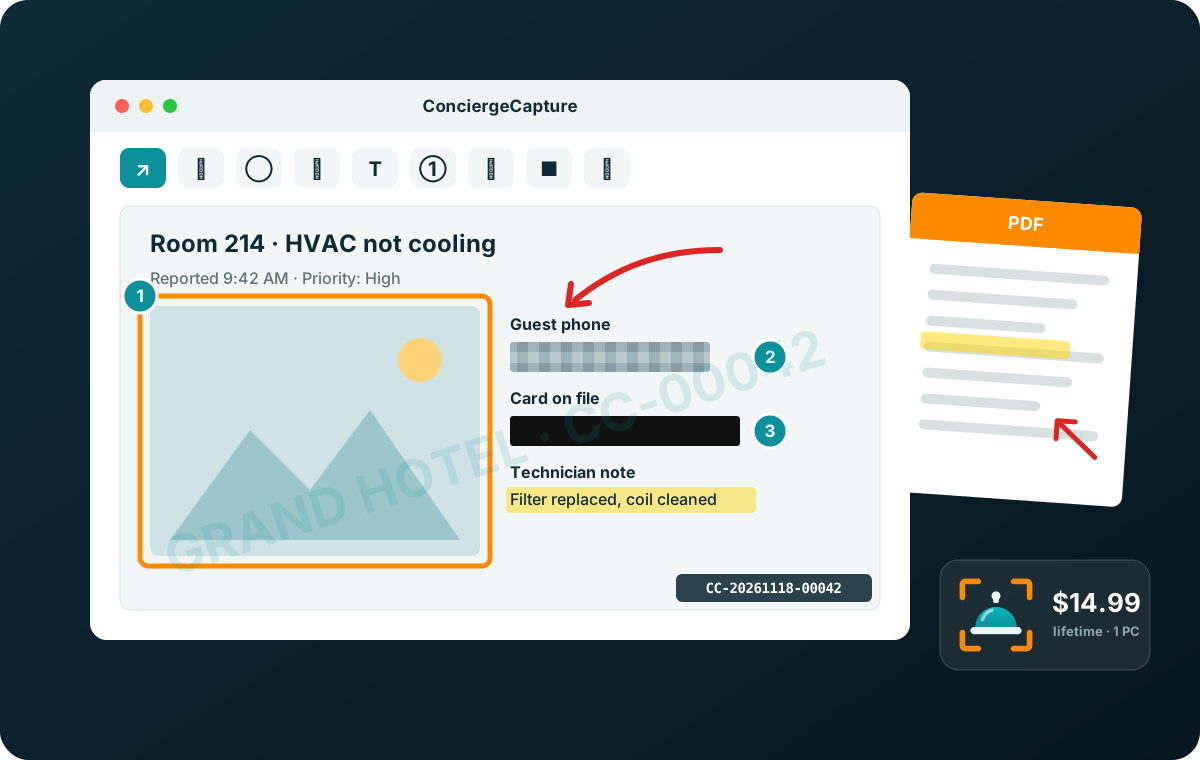
Everything a screenshot needs, nothing it doesn't.
Stop juggling Snipping Tool, Paint and a PDF editor. One small program does it all, and it stays out of your way in the tray.
Exactly what you want
- Drag a box, or click a window
- Full screen, all monitors or just one
- 3, 5 or 10 second delay for menus
- Same area again with one key
- Magnifier, size readout and color picker
- Print Screen and your own shortcut keys
Say it with arrows
- Arrows, lines, boxes, circles and pen
- Highlighter and text
- Numbered step markers 1, 2, 3
- Any color and line width
- Move, resize or delete any mark
- 50 levels of undo and redo
Private stays private
- Blur that can't be un-blurred
- Black out with a solid bar
- Crop to what matters
- Cut a strip from the middle and join the sides
Watermarks and serial numbers
- Text or logo watermark
- 9 spots, two at once, or tiled
- Opacity, size, color and angle
- Automatic serial number on every capture
Mark up any PDF
- Every page: notes, arrows, highlights
- Blur and black out on PDFs too
- Saves a new PDF; your original is never changed
- Text stays selectable
Gets out of your way
- Auto-saves to the folder you choose
- Auto-copies; the clipboard follows your edits
- Drag straight into email, Teams or Slack
- PNG, JPG, BMP, GIF or print
- Recent captures gallery
Every capture can carry its own number.
Turn on serial numbers and each capture is stamped, named and logged automatically, for example CC-20261118-00042. Put the number in your watermark, and every picture can be traced back to when it was taken.
- Stamped on the picture, in the file name, or both
- A capture log you can open in Excel
- Your own pattern, with an optional daily restart
- Made for inspections, work orders, insurance claims, evidence and client proofs
Real redaction, not a sticker on top.
Gone means gone
Anything you blur or black out on a PDF is removed from the saved file, not just covered up. Pages you don't change are kept exactly as they were.
Everything stays on your PC
No account, no cloud and no uploads. Your captures and PDFs never leave your computer unless you send them.
Built for everyone
Full keyboard control, from placing a mark to resizing it, and screen reader announcements as you work.
Pay once. Keep it for life.
Try every feature free for 7 days. Then one payment unlocks ConciergeCapture on your PC for life, with every upgrade included.
Try it first
No card, no sign-up. Download it and start capturing.
Download the free trialYours for good
Every feature, every upgrade, no subscription. Your key arrives by email the moment you pay.
Buy nowNeed it on several PCs? Choose how many on the checkout page: one license per PC.
Start your 7-day free trial.
One small program for Windows 10 and 11. Unzip it, run ConciergeCapture.exe, and it sits in the tray by the clock. Press Print Screen to capture.
Already bought? Right-click the ConciergeCapture icon by the clock, choose License…, paste the key from your email and click Activate (it needs the internet once).

Questions
Is it really a one-time payment?
Yes. $14.99 per PC, once. There is no subscription, and upgrades are free.
What happens when the trial ends?
Capturing stops until you enter a license key. Nothing you saved is touched.
Can I use it on more than one PC?
Each license is for one PC. Buy one per PC; you can choose how many on the checkout page.
The PC has no internet. Can I still activate it?
Yes. In License… choose No internet on this PC?. On any phone or computer, go to conciergecapture.com/activate, enter your key and the PC's code, and type the activation code you get into the program.
How do I uninstall it?
In Windows Settings > Apps > Installed apps, find ConciergeCapture and choose Uninstall (or right-click its icon by the clock and choose Uninstall ConciergeCapture…). It can free your license on the way out, and your captures are kept.
I got a new PC. Can I move my license?
Yes. On the old PC, open License… and click Deactivate this PC, then activate your key on the new one. Old PC gone? Write to support@saas-logic.com and we'll move it.
Does it upload my screenshots anywhere?
No. Your captures never leave your PC. The program only goes online once, to activate your license. See our privacy policy.
Which Windows versions does it run on?
Windows 10 and Windows 11.
I lost my license key.
Write to support@saas-logic.com from the email you bought with and we'll send it again.
Snip it. Mark it. Prove it.
Try it free for 7 days, then $14.99 once.
Questions? support@saas-logic.com